Forcing the Reddit App Down Your Throat…

So, browsing Reddit on your mobile, usually from Google search results, is now an exercise in frustration – Reddit will freeze your screen and force you to jump to their app.

I do not like using the app. If I can use a normal browser to navigate, there is no valid technical reason I must use your app.

So, Fennec browser, complete with uBlock Origin, to the rescue (because Chrome just sucks)!

Add the following to the “My filters”:

! Remove Reddit mobile app wall popup
www.reddit.com##.rpl-bottom-sheet
www.reddit.com##+js(remove-class, rpl-scroll-lock, body, stay)
www.reddit.com##+js(remove-class, scroll-is-blocked, body, stay)
www.reddit.com##+js(prevent-addEventListener, touchmove)

Problem fixed.

I HATE Apple

This post was in draft for a looooong time (since June 2024) – mainly procrastination and this starting out more of a “self-help” listing of “required software” turning into a self-indulgent rant… Now finally published because I just had another Mac vs. Windows argument recently…

So, I finally filled in the remaining ~60% of the post originally drafted with headlines only (e.g. “Multiple Monitor Support”, “File System Rabbit Droppings”, “Clamshell Mode”, “Power Management Control”, “Fingerprint Touch Sensor and “PD Power Supplies”) and even added current-day info (with lotsa “saved”/shared Google AI links, ‘coz pages disappear and summaries are better)… Hopefully this helps any users transitioning to Mac, despite some points probably being out of date…

WARNING: In a departure from usual posts having a more professional tone, this post is (unapologetically) laden with expletives, swearing and (apologetically) sexist terms, exposing my absolute anger and frustration on being forced to use, and defend my arguments against, poorly thought out/narrow-minded engineering. If you have sensitive eyes/ears/thinking, please ask Google AI to summarise this post for you instead. 😳  Note that is a “live” link – you will probably get different responses from different browser sessions because, you know, AI.

My experience with Apple has been nothing if short of atrocious, starting with a iPhone 6s forced upon me, so many years back, till 2021 through 2025 where I did not have a choice of Windows or OSX for a work laptop, having a Intel-based MacBook Pro 13 2020 being forced upon me, followed by a MacBook Pro 2022 w/2x USB4/TB3 ports.

I’m going to start with the bad first – draw up a strong, big drink – this is going to be a loooooooong one…

I SWEAR the next time an IT engineer tries to argue Apple’s USABILITY points with me, I’ll drive the bloody MBP through his friggin skull.

Continue reading →

Windows Volume Mount Points, Junctions and Windows 11 Firewall…

I was wondering why a simple firewall rule allowing inbound connections to some executable just would not work.

Extensive troubleshooting, excepting disabling the firewall (works), attempting relaxing any other conditions, like removing port restrictions (doesn’t work), source IP/subnet restrictions (doesn’t work), and a whole bunch of other stuff just simply did not work.

Finally frustrated, I just tried removing the targeted/allowed executable – port, source IP/subnet and other bits in place… WORKS.

WTF?

Continue reading →

Nested Partitions grub-update Mess…

Having imaged an old MBR-based partitioned disk to a VHD and back to bare metal on a now UEFI, GPT-based NVME SSD, update-grup was complaining every time:

# update-grub
Sourcing file `/etc/default/grub'
Generating grub configuration file ...
grub-probe: warning: Discarding improperly nested partition (hostdisk//dev/nvme0n1,gpt2,msdos1).
grub-probe: warning: Discarding improperly nested partition (hostdisk//dev/nvme0n1,gpt2,msdos2).
grub-probe: warning: Discarding improperly nested partition (hostdisk//dev/nvme0n1,gpt2,msdos3).
grub-probe: warning: Discarding improperly nested partition (hostdisk//dev/nvme0n1,gpt2,msdos4).

<above 4 lines repeats 11 times>

/usr/sbin/grub-probe: warning: Discarding improperly nested partition (hostdisk//dev/nvme0n1,gpt2,msdos1).
/usr/sbin/grub-probe: warning: Discarding improperly nested partition (hostdisk//dev/nvme0n1,gpt2,msdos2).
/usr/sbin/grub-probe: warning: Discarding improperly nested partition (hostdisk//dev/nvme0n1,gpt2,msdos3).
/usr/sbin/grub-probe: warning: Discarding improperly nested partition (hostdisk//dev/nvme0n1,gpt2,msdos4).

<above 4 lines repeats 29 times>

Found linux image: /boot/vmlinuz-6.17.0-22-generic
Found initrd image: /boot/initrd.img-6.17.0-22-generic
/usr/sbin/grub-probe: warning: Discarding improperly nested partition (hostdisk//dev/nvme0n1,gpt2,msdos1).
/usr/sbin/grub-probe: warning: Discarding improperly nested partition (hostdisk//dev/nvme0n1,gpt2,msdos2).
/usr/sbin/grub-probe: warning: Discarding improperly nested partition (hostdisk//dev/nvme0n1,gpt2,msdos3).
/usr/sbin/grub-probe: warning: Discarding improperly nested partition (hostdisk//dev/nvme0n1,gpt2,msdos4).

<above 4 lines repeats 23 times>

And so on… and so forth…

The great, wise ChatGPT was convinced that this was the work of the devil and that the “Microsoft Reserved Partition” partition was without a “soul” (file system) and would need to be “cast out” (excluded) by grub-prober… And then went on to instruct me to “add the file system UUID” to my /etc/default/grub via the GRUB_OS_PROBER_SKIP_LIST="<UUID>@/dev/nvme0n1p2" line… Never mind it just told me there is no file system for the MSR partition (and therefore no file system UUID)…

Continue reading →
Rebuilding Ubuntu LTS on WSL2 and Interfering Docker Integrations

In an attempt to get some AMD iGPU accelerated apps to run via Ubuntu LTS on WSL2, I had rebuild my Ubuntu LTS “VM” under WSL2.

  • I had to first remove the existing Ubuntu LTS (named “UbuntuLTS”): wsl --unregister UbuntuLTS

WARNING: Although multiple sources state that the source .vhdx file does not get deleted, it actually does get deleted for me! 🙄

  • I re-downloaded the .wsl file directly from Ubuntu, then installed the VM manually:

wsl --install --from-file "ubuntu-24.04.4-wsl-amd64.wsl" --name UbuntuLTS --location "D:\WSL\UbuntuLTS" --no-launch

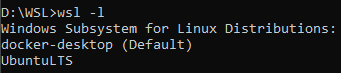
Note that if you have Docker already installed, the default “distro” WSL2 may have been set to Docker’s docker-desktop:

  • set the correct default: wsl --set-default UbuntuLTS
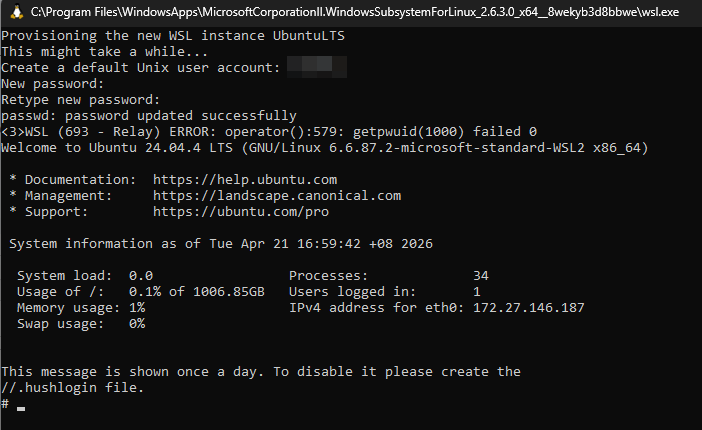
  • run wsl.exe and it will launch into the newly created distribution, set a new (default) user and password… and ignore the stupid <3>WSL (299 - Relay) ERROR: operator():579: getpwuid(1000) failed error 🙄
    • NOTE: the error will “go away” after a wsl --shutdown and restart…


  • turn on the integration in Docker again…  and watch errors pop up…
    An error occurred while running the command. DockerDesktop/Wsl/ExecError: c:\windows\system32\wsl.exe -d -e sh -c cat - > ~/.docker/config.json: exit status 1 (stderr: , wslErrorCode: DockerDesktop/Wsl/ExecError)

Continue reading →

AMD Radeon Software Hanging Windows Explorer…

So, another day, another IT f*ck-up…

AMD’s in the crosshairs today. Due to having to muck around with AMD iGPUs in/on a WSL2-hosted Ubuntu LTS VM, I had to install an “older” AMD Radeon 26.2.2 driver…

Now, every time I right-clicked on a drive, a folder or a file in Windows Explorer, the stupid Radeon dashboard launches… and proceeds to “hang” Windows Explorer (with your mouse cursor turning into a spinning cursor) until something times out and hands Windows Explorer back its head…

  • No, killing the dashboard immediately does not give Windows Explorer back its head
  • No, attempting the registry hacks found across the ‘net did not help
  • No, disabling all non-Microsoft “Context Menu” items via ShellExView did not help

What did help was one of the suggestions by Google’s “AI Mode”!

i.e. F*ck Rename C:\Program Files\AMD\CNext\CNext\RadeonSoftware.exe (as an Administrator, of course).

Xiaomi Mi 13 Pro Boot Loop…

I had the misfortune of experiencing an “incurable” (or so I thought) boot loop that forced me to send for a replacement (near its end of its 2-year warranty) from Xiaomi late last year…

That meant I lost all my latest photos and messages not already backed up…

Another Mi 13 Pro I had on hand experienced the same boot loop.

In frustration and not wanting to lose any information, I searched the Internet to see what could be done…

Apparently, there was a potential fix – I tried it and it worked for me!

YMMV

Adventures with a Qotom C3758R Unit

I purchased a Qotom Intel Atom (“Denverton”) C3758R* w/4x SFP+ port “mini server”, with the intention to utilise the SFP+ ports and upgrade my home Internet connection to 10Gbps…

Here are some of the main (pain?) points:

  • I had to obtain the manual from the seller/supplier; I’m plugging it here for convenience…
  • WARNING: VGA-only!
    • I bought the device, more worried about the number of ETH and SFP+ ports than “trivialities” like the display output (expecting anything post-2020 to have HDMI or DP output), so was totally caught off guard when it arrived with only VGA output, with nary a VGA-capable display in sight…
    • I dragged the device to an older Dell 2719H display that was nearby, and “borrowed” a VGA cable from my cousin, then proceeded to start testing…
    • thankfully, a “rushed order” Vention VGA-to-HDMI* adapter came to the rescue soon after – beware that although it supported the BIOS mode, certain other low-resolution text modes are not (looking nastily at gparted‘s keyboard mapping/initialisation screen); I cannot say if the installation of the Ubuntu 24.04 LTS image from my Ventoy multiboot USB stick would work through the VGA adapter, as I did the installation using the Dell 2719H display…
    • as a back up, you could attempt to configure and install everything through the console…
  • AMI BIOS with Test MOKs (Machine Owner Key)!
  • Slow start-up w/A-Tech 2x 32GB DDR4 3200MHz ECC Unbuffered SODIMMs* (yes, I may confirm they work, but as of writing this, there is a cheaper NEMIX alternative* – from Amazon Singapore anyway)
    • due to RAM tests, you get a blank screen all the way till after BIOS and VGA output is initiated (and not because of the aforementioned VGA-to-HDMI adapter being unable to convert either – this happened with the VGA-capable Dell 2719H also)
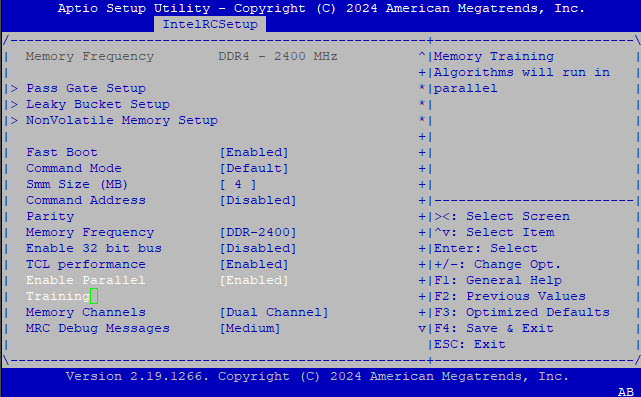
    • I had to set the BIOS options to do start-up memory tests in parallel (which sped things up a bit) (picture from the console redirection through PuTTY):
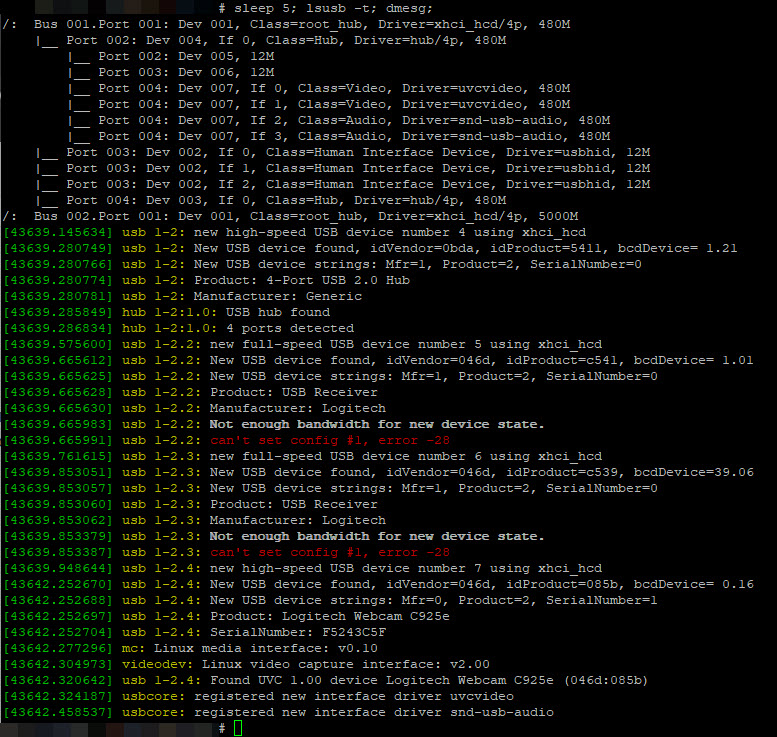
  • the on-board USB3 controller does not play nice with my IOGear 4-port GUS434 USB3.0 switch* (which I believe is a white-label of the Aten US434*) although it worked just fine on Windows and Mac OSX:

    • repeated attempts to play around in the BIOS’ USB settings ultimately resulted in an accidental USB port disablement – i.e. keyboard lock-out, which meant having to open the thing up to pull the battery, waiting a minute, then plugging everything back in and setting up the BIOS options again (because I hadn’t gotten my USB-to-serial cable and OS console redirection working yet)…
    • TBH, I believe this is a Linux kernel bug, but after many wasted hours, I still haven’t figured out how to fix this…


  • dmesg warnings:
    • workqueue: drm_fb_helper_damage_work hogged CPU for >10000us 256 times, consider switching to WQ_UNBOUND
    • ismt_smbus 0000:00:12.0: completion wait timed out
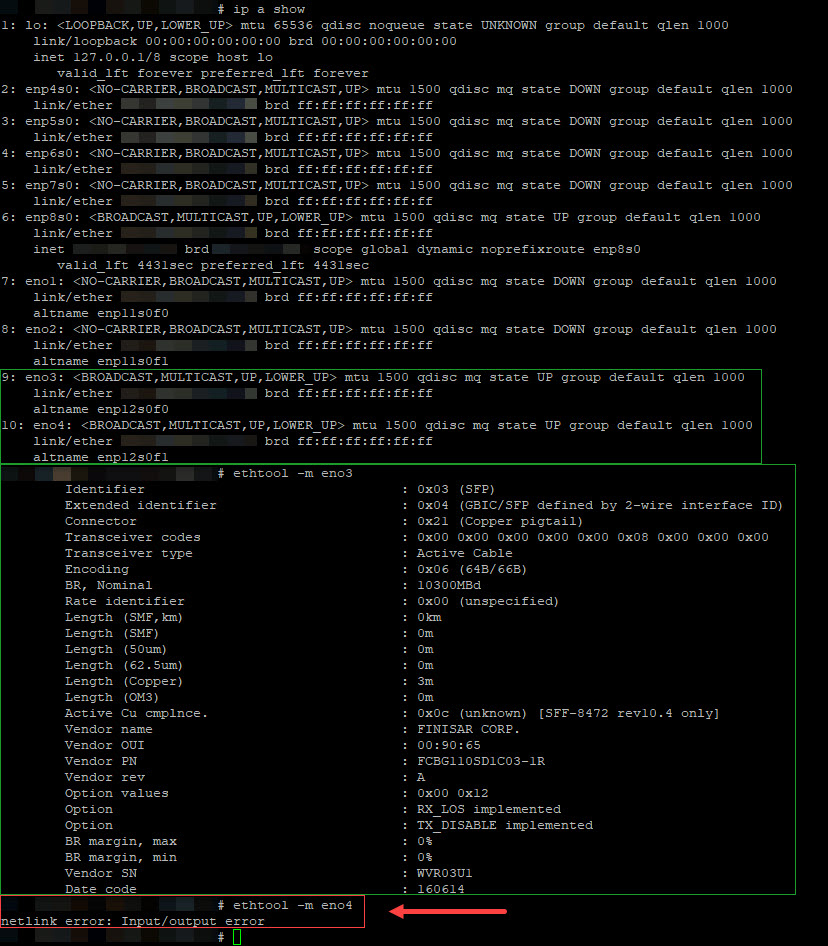
  • Intel X553 port #4 (eno4) doesn’t seem to be working properly (ethtool -m fails), although links can be brought up:


  • booting and controlling the unit through the serial console redirection:
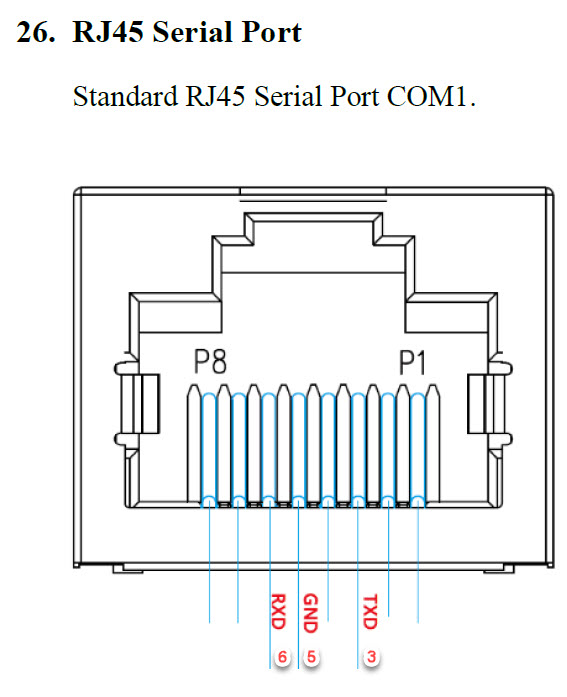
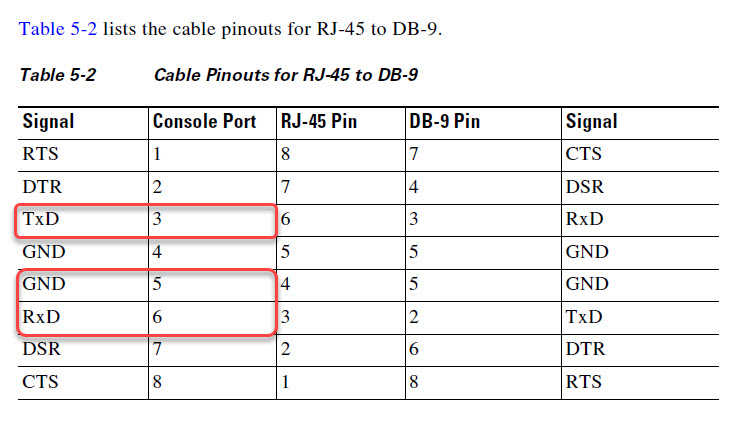
    • another rushed order for a USB to RJ45 serial/console cable* enabled me to utilize the “standard” console port of the C3758R (for the arguable use of the word “standard”):
      • from the Qotom C3758R user manual, with my own annotations denoting pin number:
      • screenshot from Cisco’s ASA 5585-X Cable PDF with the “important” bits highlighted:
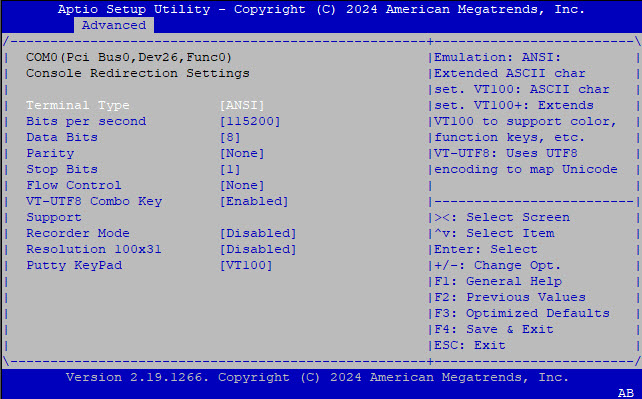
    • thankfully, by default, the BIOS is set to automatically redirects to the console with the following parameters:

      • you may just wish to change the “ANSI” setting to “VT100+” (like I did before taking this screenshot – the “ANSI” value selected is just for depicting actual values) just to “clean up” the UI, as PuTTY doesn’t seem to handle the ANSI character formatting all that well…
    • searching dmesg post-Ubuntu-install showed ttyS4 as the serial port device


So far, so good, I will provide more updates as I go through the process of OS + QEMU+KVM installation, testing of the SFP+ direct-attached optical connectors and RJ45 10GbE modules.

2025/08/11 Update:

As promised, the follow-up is now live.


*NOTE: This is an affiliate link, so I may get some commission, but at no additional cost to purchasers purchasing through this link. For Amazon Affiliate links, as an Amazon Associate, I earn from qualifying purchases.

CPanel Email Filters

As part of managing my own web presence, including a hosted email server with limited users (both in numbers and geography), I tend to try and cut large swathes of spam by simply “binning” any emails that have any association with specific TLDs, like .ru or .us or .cn– whereby I know that my users and I have no legitimate reason to receive any email coming from those TLDs or passing through servers using any such TLDs.

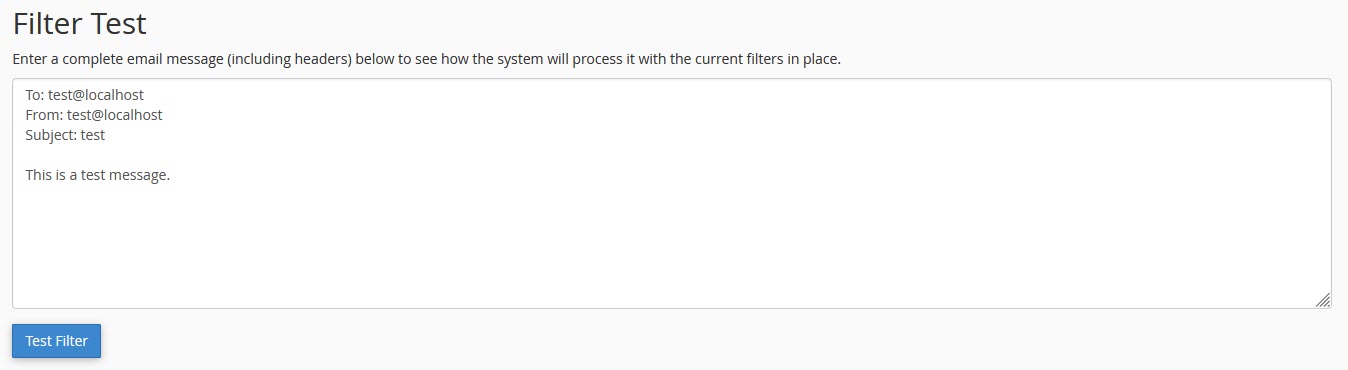
However, it came to pass that some ham were getting caught, but simply looking at the email headers was not helping. Using CPanel’s in-built testing tool was helpful in surfacing which of my rules was triggering the spam trap, but not exactly why (or what part of the email was triggering it).

The triggering rule looked like regex, so I immediately tried to hunt down converted/parsed file to try and copy the rule in converted regular expression form.

Attempting to poke at the ~/.cpanel/filter.yaml and ~/.cpanel/filter.cache and even the /etc/vfilters/<domain> did not turn up the regular expressions I was looking for.

In desperation, I took a quick look at the CPanel test tool results and decided to just copy the regex shown outright…

Unfortunately, pasting that regex directly into a regex test tool did not work…

Continue reading →

When Firefox Does A Microsoft… (aka Forcing Firefox To Listen To YOUR Settings And NOT Update…)

So, Firefox decided to drop support for “old technology” plugins… Since I could not find web-extension updates for some of my required plugins or they are not ready yet (e.g. Tab Mix Plus, now called Tab Mix – Links)…

Easy-peasy: install ESR 52.9.0, then disable auto-updates… Done!

Not quite… I booted my PC this morning only to find Firefox, flicking a big middle finger to all its advanced users, had ignored my settings to not auto update – and proceeded to update itself to ESR 60.2…

Obviously, this got me royally pissed as I had to waste time rolling back and setting it up as I originally chose (i.e. no updates); and so I wasted some time to track down and neuter their update capabilities once and for all.

Continue reading →