Nested Partitions grub-update Mess…

Having imaged an old MBR-based partitioned disk to a VHD and back to bare metal on a now UEFI, GPT-based NVME SSD, update-grup was complaining every time:

# update-grub
Sourcing file `/etc/default/grub'
Generating grub configuration file ...
grub-probe: warning: Discarding improperly nested partition (hostdisk//dev/nvme0n1,gpt2,msdos1).
grub-probe: warning: Discarding improperly nested partition (hostdisk//dev/nvme0n1,gpt2,msdos2).
grub-probe: warning: Discarding improperly nested partition (hostdisk//dev/nvme0n1,gpt2,msdos3).
grub-probe: warning: Discarding improperly nested partition (hostdisk//dev/nvme0n1,gpt2,msdos4).

<above 4 lines repeats 11 times>

/usr/sbin/grub-probe: warning: Discarding improperly nested partition (hostdisk//dev/nvme0n1,gpt2,msdos1).
/usr/sbin/grub-probe: warning: Discarding improperly nested partition (hostdisk//dev/nvme0n1,gpt2,msdos2).
/usr/sbin/grub-probe: warning: Discarding improperly nested partition (hostdisk//dev/nvme0n1,gpt2,msdos3).
/usr/sbin/grub-probe: warning: Discarding improperly nested partition (hostdisk//dev/nvme0n1,gpt2,msdos4).

<above 4 lines repeats 29 times>

Found linux image: /boot/vmlinuz-6.17.0-22-generic
Found initrd image: /boot/initrd.img-6.17.0-22-generic
/usr/sbin/grub-probe: warning: Discarding improperly nested partition (hostdisk//dev/nvme0n1,gpt2,msdos1).
/usr/sbin/grub-probe: warning: Discarding improperly nested partition (hostdisk//dev/nvme0n1,gpt2,msdos2).
/usr/sbin/grub-probe: warning: Discarding improperly nested partition (hostdisk//dev/nvme0n1,gpt2,msdos3).
/usr/sbin/grub-probe: warning: Discarding improperly nested partition (hostdisk//dev/nvme0n1,gpt2,msdos4).

<above 4 lines repeats 23 times>

And so on… and so forth…

The great, wise ChatGPT was convinced that this was the work of the devil and that the “Microsoft Reserved Partition” partition was without a “soul” (file system) and would need to be “cast out” (excluded) by grub-prober… And then went on to instruct me to “add the file system UUID” to my /etc/default/grub via the GRUB_OS_PROBER_SKIP_LIST="<UUID>@/dev/nvme0n1p2" line… Never mind it just told me there is no file system for the MSR partition (and therefore no file system UUID)…
Continue reading

Rebuilding Ubuntu LTS on WSL2 and Interfering Docker Integrations

In an attempt to get some AMD iGPU accelerated apps to run via Ubuntu LTS on WSL2, I had rebuild my Ubuntu LTS “VM” under WSL2.

  • I had to first remove the existing Ubuntu LTS (named “UbuntuLTS”): wsl --unregister UbuntuLTS

WARNING: Although multiple sources state that the source .vhdx file does not get deleted, it actually does get deleted for me! 🙄

  • I re-downloaded the .wsl file directly from Ubuntu, then installed the VM manually:

wsl --install --from-file "ubuntu-24.04.4-wsl-amd64.wsl" --name UbuntuLTS --location "D:\WSL\UbuntuLTS" --no-launch

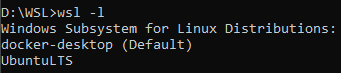
Note that if you have Docker already installed, the default “distro” WSL2 may have been set to Docker’s docker-desktop:

  • set the correct default: wsl --set-default UbuntuLTS
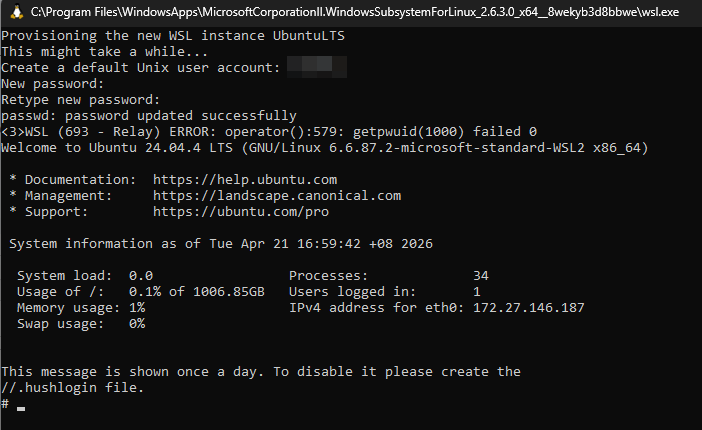
  • run wsl.exe and it will launch into the newly created distribution, set a new (default) user and password… and ignore the stupid <3>WSL (299 - Relay) ERROR: operator():579: getpwuid(1000) failed error 🙄
    • NOTE: the error will “go away” after a wsl --shutdown and restart…


  • turn on the integration in Docker again…  and watch errors pop up…
    An error occurred while running the command. DockerDesktop/Wsl/ExecError: c:\windows\system32\wsl.exe -d -e sh -c cat - > ~/.docker/config.json: exit status 1 (stderr: , wslErrorCode: DockerDesktop/Wsl/ExecError)

Continue reading

AMD Radeon Software Hanging Windows Explorer…

So, another day, another IT f*ck-up…

AMD’s in the crosshairs today. Due to having to muck around with AMD iGPUs in/on a WSL2-hosted Ubuntu LTS VM, I had to install an “older” AMD Radeon 26.2.2 driver…

Now, every time I right-clicked on a drive, a folder or a file in Windows Explorer, the stupid Radeon dashboard launches… and proceeds to “hang” Windows Explorer (with your mouse cursor turning into a spinning cursor) until something times out and hands Windows Explorer back its head…

  • No, killing the dashboard immediately does not give Windows Explorer back its head
  • No, attempting the registry hacks found across the ‘net did not help
  • No, disabling all non-Microsoft “Context Menu” items via ShellExView did not help

What did help was one of the suggestions by Google’s “AI Mode”!

i.e. F*ck Rename C:\Program Files\AMD\CNext\CNext\RadeonSoftware.exe (as an Administrator, of course).

“Unrooting” WSL…

WSL starts as root user be default.

Here’s how to ensure it runs as a “non-root user” (assumedly already created), which you then have to su and/or sudo <something> to act as root:

  • either/and:
    • modify a shortcut or change Windows Terminal’s Profile to set the distribution (if required) and the user name, and starting in the user’s home directory:
      • wsl -d <distro> -u <user> -cd ~
    • edit /etc/wsl.conf to always start with a specific user:
      • [user]
        default=<user>

Simple! (Not!)

Unifi Controller

I had a docker container of the jacobalberty/unifi “all-in-one” Unifi Network Application, and I somehow garbled the password…

The fix?

  • enter the container:
    • docker exec -it <container_name> /bin/bash
  • run MongoDB CLI:
    • mongo --port 27117
  • find the administrator user name/s:
    • use ace;
    • db.admin.find().forEach(printjson);
  • you should see one or more name entry/entries:
    • "name" : "<user_name>"
  • set/reset the password (to “password“):
    • db.admin.update( { "name" : "<user_name>" }, { $set : { "x_shadow" : "$6$ybLXKYjTNj9vv$dgGRjoXYFkw33OFZtBsp1flbCpoFQR7ac8O0FrZixHG.sw2AQmA5PuUbQC/e5.Zu.f7pGuF7qBKAfT/JRZFk8/" } } )

You should be able to log right back in with the reset password.

LAGGing pfSense… Manually…

Throughput through my KVM-hosted pfSense was abysmal for a 10Gbps link – despite the Intel Core i7 155h host w/128GB 5600Mhz RAM doing nothing else but hosting the pfSense VM (replete with VFIO-passthrough)…

I could get ~8-9Gbps iperf3 performance on from my PC to the WAN interface, which was “OK”, but iperf3 from pfSense out to various 10Gbps-capable public iperf3 servers was bad, as was Ookla speedtest.net results (from my PC).

In an attempt to figure out if the virtualisation was part of the issue, I attempted to run pfSense bare metal (via dual-booting – which had a whole storied journey itself)…

First boot brought up all the interfaces (thankfully) for selection – but no way to set up LAG then choose that for my WAN/LAN interface…

Continue reading

