LAGGing pfSense… Manually…

Throughput through my KVM-hosted pfSense was abysmal for a 10Gbps link – despite the Intel Core i7 155h host w/128GB 5600Mhz RAM doing nothing else but hosting the pfSense VM (replete with VFIO-passthrough)…

I could get ~8-9Gbps iperf3 performance on from my PC to the WAN interface, which was “OK”, but iperf3 from pfSense out to various 10Gbps-capable public iperf3 servers was bad, as was Ookla speedtest.net results (from my PC).

In an attempt to figure out if the virtualisation was part of the issue, I attempted to run pfSense bare metal (via dual-booting – which had a whole storied journey itself)…

First boot brought up all the interfaces (thankfully) for selection – but no way to set up LAG then choose that for my WAN/LAN interface…
Continue reading

Making the Intel X710-DA4 Work…

Apparently, making this 4x SFP+ card work is not as straight forwards as I thought…

  • LACP (aka Link Aggregation aka 802.3ad) would not work properly under Linux, Windows, VMware or FreeBSD unless a “private flag” was disabled using ethtool (source #1, #2)

Sigh, so much for “plug and play pray”…

As per the source/s instructions, I created a /etc/networkd-dispatcher/configuring.d/90-disable-on-chip-LLDP.sh:

#!/bin/sh
if expr "$IFACE" : <interface prefix> >/dev/null; then /sbin/ethtool --set-priv-flags "$IFACE" disable-fw-lldp on fi

WARNING: Make sure your <interface prefix> is able to only address the X710 interfaces, or you will likely get errors or, worse, brick your NIC. As an example, my X710 interfaces are all named enp1s0fN so I use the <interface prefix> of “enp1s0f”

To check, simply give the command ethtool --show-priv-flags <interface prefix>.


2026/04/21 Update:

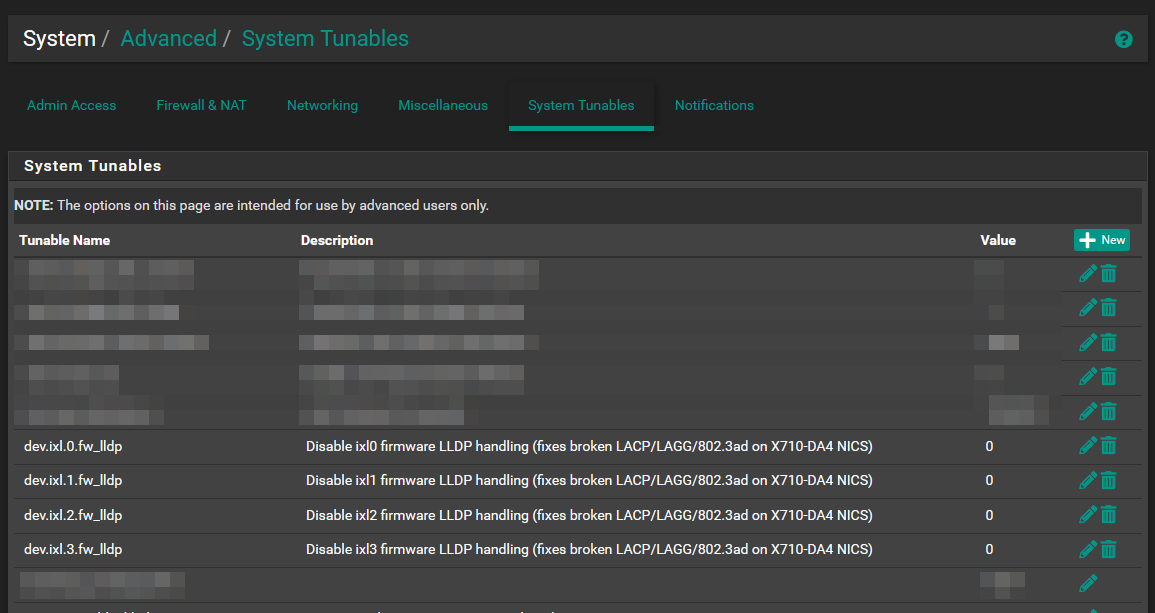
After recently rebuilding and using passthrough of the X710-DA4 ports to pfSense in an attempt to boot performance, the instructions have to change since FreeBSD (and pfSense in turn) do not have ethtool. Instead, set the System Tunabledev.ixl.n.fw_lldp” to “0“, where n is the 0-based port number (0 to 3 in my case of a four-port card).

netplan Not Going To Plan…

With a /etc/netplan/00-global.yaml having the following contents:

network:
  version: 2
  renderer: networkd

And all other .yaml files in the /etc/netplan directory not having an explicit renderer, the system should default to networkd… Just netplan apply and done! Simple, right?

Yeah, right.

Seems like netplan apply still thinks to use NetworkManager even when no single .yaml file declares its use; and since I disabled and masked the service, netplan apply was complaining NetworkManager was masked.

The secret sauce?

Continue reading