I used to swear by the very useful, but extremely complicated (and easy to break your OS if you get it wrong, but free) Comodo Internet Security suite, which included Comodo Firewall…
Unfortunately, having been forced to upgrade to Windows 11 a few months back, replete with feature retardation, my trusty ol’ CIS 12.x no longer worked (properly), and I had to switch to the “plain ‘ol Windows Firewall” – which works great except for the rules and rules management. Working with the Advanced Firewall console UI is a nightmare, and not being able to quickly allow something that was blocked renders the plain ‘ol Windows Firewall unusable.
I may have gotten the following versions and timelines wrong: When I initially tested Windows 7, I knew ZoneAlarm 7.x was not compatible (then), I actually looked at, and bought, BiniSoft’s WFC before finally settling on CIS… I returned to BiniSoft in 2024 only to find out that it had been bought out in 2018 by Malwarebytes…
Nevertheless, background and fuzzy memory aside, I was chugging along on Windows 11 (sans LACP’d 10Gbps NICs) with “just” Windows Firewall and WFC, when I must have changed something, because, all of a sudden:
- attempting to pull up the connection logs through WFC resulted in a never-ending “loading” prompt
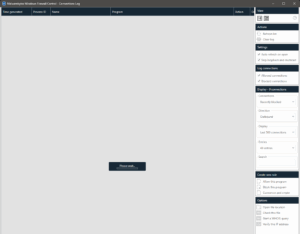
- attempting to change any setting in the Windows Defender Firewall with Advanced Security console (i.e. running
wf.mscwith Administrator privileges) failed with a repeated “access denied” message
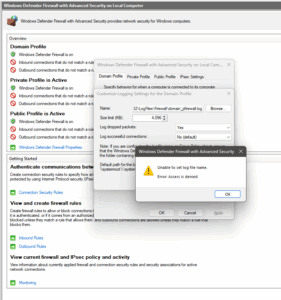


Checking the ‘net did not help much:
- explicitly adding
NT Service\mpssvcuser and even myself to security ACL of the (default)C:\Windows\System32\LogFiles\Firewalldirectory and the created .log files with “Full Control” permissions did nothing - attempting to edit anything via the registry still worked, but the never-ending connection logs UI was still a problem
I bashed my head against this issue for the better part of some 3 hours before some memory synapses lit up…
I recalled I had checked WFC’s “Secure Profile” setting – and somehow, this caused all the trip-ups…

Unchecking that solved all my issues… Go figure…
Might be time to look at CIS again (if there’s any official word for Windows 11 support), or maybe switch to Fort Firewall, which supports wildcard paths.
2026/05/10 Update: Quite late to the party, but I found out about this “hack” introduced by the developers… Yes, it does “support” ever-changing executables (Windows Apps, Chrome, etc.), but it does so (1) in a fairly “insecure” manner (not regex based), and (2) does so by creating new rules, while leaving “old” rules to be manually deleted.
