Exporting Clips Off A Dahua NVR Part Trois

New NVR, (Re)new(ed) Problems…

I was trying to find out why I could not see some export controls from the NVR’s web interface, similar to this

Turns out that, for now, I still need to use “IE Mode” in Microsoft Edge – but as the title posits, it ain’t easy (or at least, it is not just a “button click” away). Microsoft has buried Internet Explorer waaay below 6ft underground…
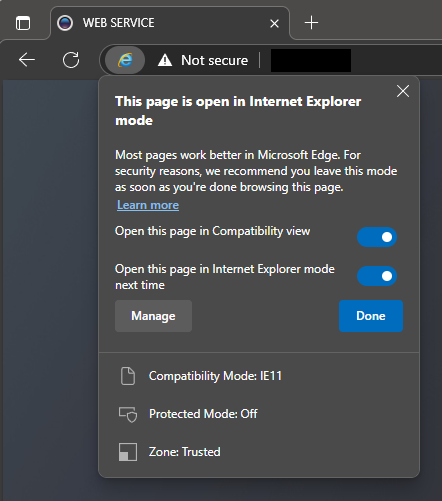
Microsoft Edge in “Internet Explorer mode”

Just in case that Microsoft link breaks, here is the rundown:

  • in the address bar for Microsoft Edge, type edge://settings/defaultbrowser and then click Enter
  • slide the Allow sites to be reloaded in Internet Explorer toggle to ON
  • restart Microsoft Edge (cue the wind down your window, wind up your window joke from the 90’s)
  • navigate to the website you want to view in Internet Explorer mode
  • click the three dots in the upper right corner of the browser window
  • select Reload in Internet Explorer Mode


Exporting Clips Off A Dahua NVR Part Deux…

So, another day, another kid, another requirement to pull video off the DVR…

I totally forgot about my previous post and attempted to use the in-built NVR software (which requires ye ‘old Internet Explorer because it’s an ActiveX plugin) and, to my amazement, discovered that the video extraction actually works (although you still need to manually convert .dav video to something else that’s, you know, a known standard that is universally playable)… I am not sure how I missed this the last time, but oh well…

Anyway, as per usual, the quick instructions are here for posterity and future reference…

Continue reading

Playing and Converting Dahua NVR’s .dav H264 Videos…

Well, as if fighting the NVR in attempting to export video clips ain’t enough. There’s a need to convert stuff just to play ’em back…

I tried a solution using VideoLAN’s VLC Media Player, but that was a hit-or-miss affair (i.e. sometimes it worked, other times, not).

Enter FFMPEG

Continue reading

Exporting Clips Off A Dahua NVR…

I recently had an unfortunate episode requiring the exporting of a clip off a Dahua NVR, but I needed someone else to do it… (and no, I was not in jail, trying to instruct someone else to pull exonerating evidence off some CCTV, if that was what you were thinking)…

My original method of using the in-built web UI off the NVR, manual streaming conversion via VLC Player (after fiddling with it for a temporal configuration change to “enable” playback of .dav files) was just not going to “cut it”…

So, once I had the time, I waded into the battle of the forever-changing, forever-beta nature of Dahua firmware, software and hodge-podge end-user solutions…

SmartPSS

There happened to be a “new” version of the SmartPSS software (v2.002.0000008.0.T.190801); which was supposedly released a month ago (2019/08/01, as of writing this). This software was “supposed” to have had some (old) “enforced 1 hour video export” bug fixed. However, I was pulling my hair out as to why I could not seem to limit the video clip I chose to export. I finally found my clue and therefore am posting this here for posterity (actually, to enable other people to follow the same instructions to do this).

Continue reading