Replacing Multiple Spinning Disks Simultaneously or Serially…

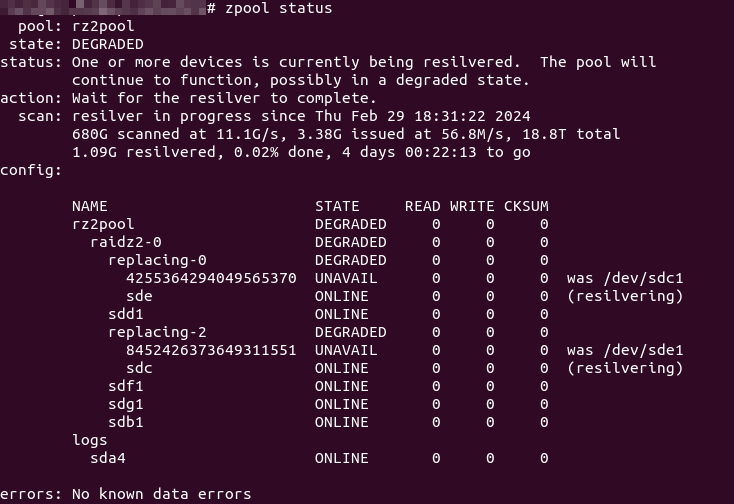
So, with a 6-drive RAIDZ2, I faced a drive failure over a year ago with a “hung” Windows host (hosting the Ubuntu Server LTS Hyper-V VM with pass-through, direct access to the 6 physical HDDs used for the RAIDZ2 array) – the Windows UI was still responsive but any drive reads (e.g. Windows Explorer navigation, starting an app) “hung” the offending app attempting the drive reads (even if the dying drive was not the drive being read from)… With 2x 6TB “spares” on hand purchased over time (2017, 2018) for just such an event, a VM-and-host shutdown, HDD swap and a quick zfs replace <pool> <old GUID> <new /dev/sdx> and a “quick” resilver brought everything back to normal.

Then, three months back, I then started facing 2 failed drives – I had the one remaining 6TB “spare” replacement drive for the first, but after a 2nd failure in the span of these three months (without purchasing another set of standby replacements), it was time to start considering replacing all the drives (slowly).

Not too shabby, with ~7+ years’ lifespan of near 24/7 powered-on, low-drive write loads, with some pretty bad temperatures (near constant 50°+C to 60°C, no matter how I tried to force air flow when these were still in the DS380):

  • 2x Seagate ST6000DX001:
    • from March 2015
      • 1x failed in August 2016; RMA/replacement still running
  • 2x Seagate ST6000DM001:
    • from November 2015
      • 1x failed in November 2022
      • 1x failed in November 2023
  • 4x Toshiba X300 HDWE160:
    • 2x from July 2016
    • 1x from November 2017 (spare)
      • 1x (surprisingly the replacement drive from November 2017 that was “just” plugged in in November 2022) (just) failed in February 2024
    • 1x from November 2018 (spare)

I therefore purchased 2x Seagate Exos X18 16TB HDDs, with another still on the way… Wanting to minimise the number of resilver attempts (straining the surviving 6TBs), I attempted to pull a working drive from the degraded 5-drive RAIDZ2 array and plugged both new 16TBs in, fingers crossed that none of the remaining 4 drives give up the ghost while resilvering (confident I had important data backed up elsewhere).

I gave the replacement commands one after another:
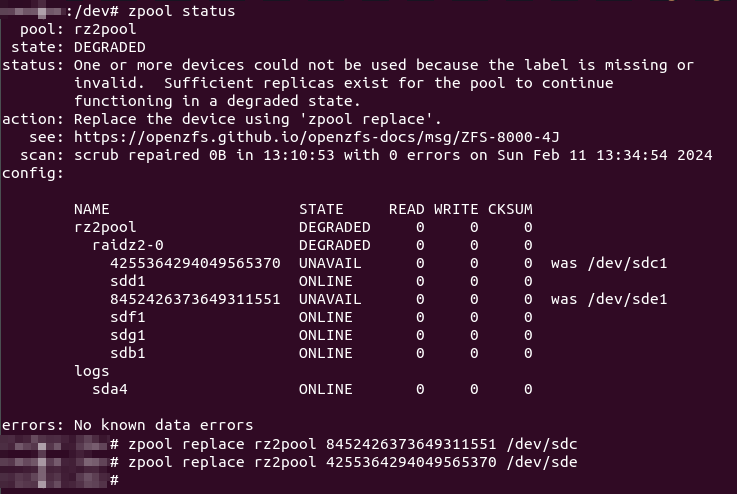
2024/03/03 Update: Don’t assign the whole disk, manually create a partition instead and assign that as replacement instead!

And that seems to work… So, 11+ hours later, nearing the end of the resilver process, I was eagerly checking the status…
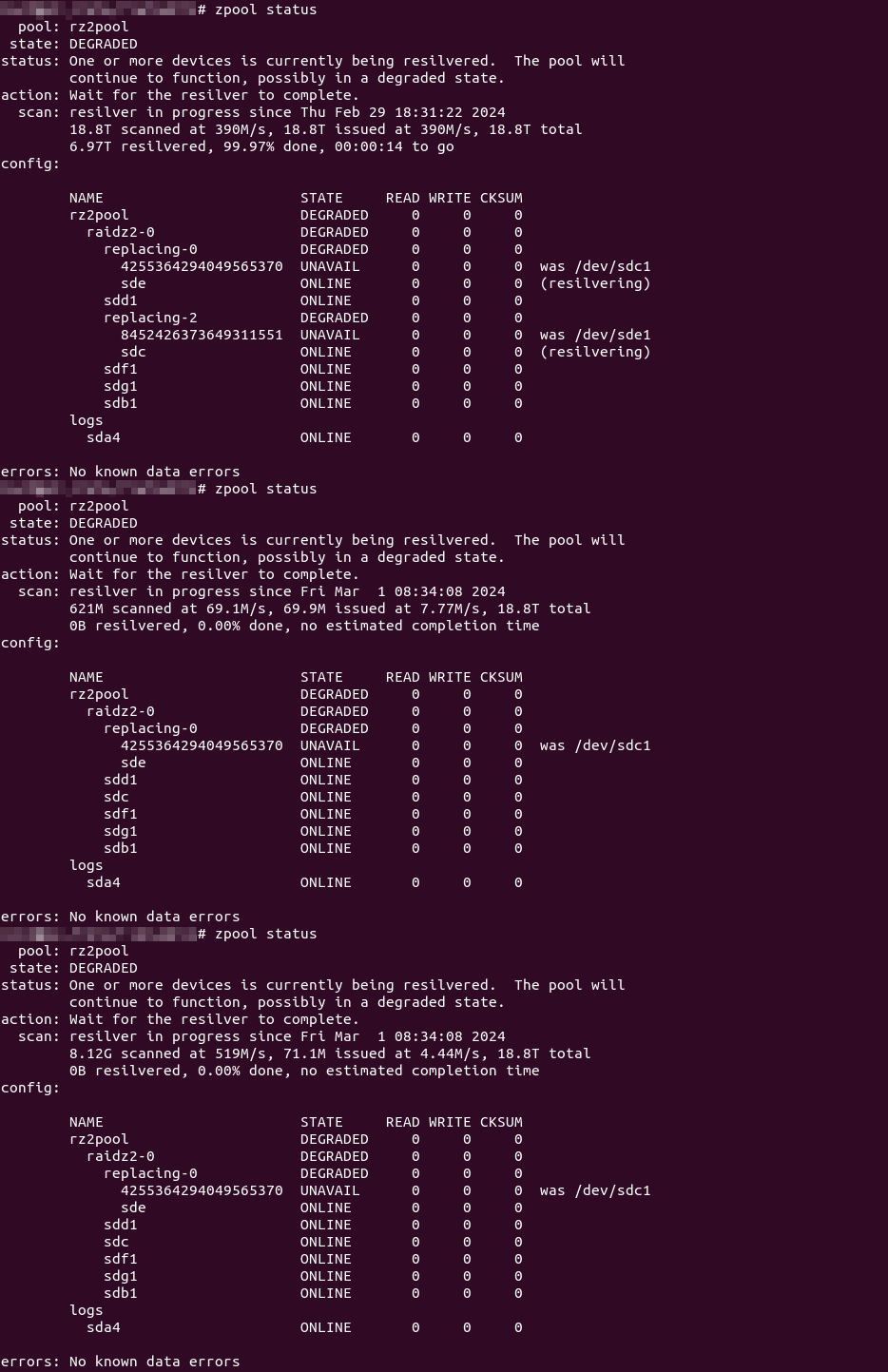
Wha..?!? Resilvering only completed on one drive (and was only now starting on the other)!
Continue reading

Ubuntu 22.04.1 Upgrading Pains…

So, I had left my little Ubuntu server alone and neglected, giving it the occasional glance, the occasional log in and do an apt-get update && apt-get autoremove

Well, with my recent shenanigans surrounding a power cut (self-caused, mind you), I was also prompted to upgrade to Ubuntu LTS 22.04.1…

.1“… Well! That should be more stable (than the .0 released back in April)! O00-kay! Time to give it a whack!

Turns out, things went south pretty fast and I needed half an evening to right everything…

Continue reading

Missing The (Mount) Point…

So my Silverstone DS-380 casing’s power LED seems to have bought it… In an attempt to try fix it (or at least test it), I had to get to the motherboard and that meant I had to remove all the drives, drive cage, etc… Since piecing everything back together again was a pain, I left the 3.5″ spinning media drives out to boot the system several times during testing.

After giving up on the power LED, I re-plugged in everything + the drives… Only to find that, of some 11 different ZFS sub pools, 10 were missing

My heart stopped and the universe whirled around me…

zpool status showed the drives were all present and accounted for…

Thankfully, zfs list showed all my ZFS sub pools/”partitions” were still there… So, what gives?

Continue reading

su-up!

So, I finally got sick of typing my root user password in my Windows Subsystem for Linux (WSL), *nix Docker containers and Linux servers…

The answer (for some flavours of *nux): just create an addendum to /etc/sudoers by creating any new file in the /etc/sudoers.d/ directory!

Continue reading

Clamping Down HARD on DHCPd MACs…

There is an eight year old issue (at the point of writing this) with pfSense DHCPd that somehow did not restrict DHCPd IP “handouts” despite the chosen setting to “Deny unknown clients”… Which, after some digging, turns out more to be of a misunderstanding than what the “common people” would think.

Despite the “Deny unknown clients” setting, certain clients requesting an IP from a pool/interface that does not explicitly list its MAC address will still get an IP address. It turns out that said client is considered “known” if the MAC is listed anywhere else (i.e. in some other MAC address list)…

Anyway, I got fed up with this seemingly insecure behaviour and managed to hack a fix… some 8+ months ago… Just that I never got around to posting the details for people willing to hack their own pfSense fix (unlike my other SSHd configuration fix which was documented in full)…

Well, to cut the long story short, the pull request (merged with another upstream fix) has now been accepted and merged (actual changes)… You will see this fix some-time-soon-now in some upcoming pfSense release… Enjoy!

2021/02/28 Update: A year later and only now is the DHCPd fixes released with a new stable release (2.5.0), instead of the expected 2.4.x! Well, it’s “finally out there”…

2021/06/01 Update: As of time of writing, it appears that 2.5.0 and 2.5.1 are, unfortunately, bugged and I do not recommend upgrading to 2.5.0/2.5.1…

2021/07/07 Update: pfSense 2.5.2 is now released… YMMV…

A Weasel for WSL…

So I have been using Windows Subsystem for Linux (WSL) for a while now (specifically, the “Microsoft’ed” version of Ubuntu 18.04).

Recently, I have had to use my local desktop to handle some git stuff, and I decided to do so within WSL. First up, I ran headlong into access problems – I run PuTTY Pageant and did not want to explicitly run ssh-agent inside WSL, not to mention maintaining a duplicate of my private keys in the WSL environment(s).

Well, agent forwarding was made for a reason, so I immediately set off to find a solution.

Continue reading

GNU getopt Needs A Helper

So, recently at work, I found myself knee deep in… scripts…

Most of my scripts had ugly positional parameters/arguments (you know, $1 was the value for this, $2 was the input for that)… So, I dug up getopt… But then I quickly spiralled down the time-sucking rabbit hole of trying to automate some other bits, like being able to print the “usage” by “simply” plucking out all the options given to getopt in the first place…

Continue reading

sed Shennanigans…

Escaping…

For anyone familiar with regular expressions, the need to escape characters, that might otherwise be construed as some “special command”, is a regular affair…

sed posed a particular challenge for me when attempting to escape variables that are used as a replacement string. So, to cut the long story short, after 8 hours of trying, testing and re-testing, I finally got the solution…

In a bash shell, try the following:

TESTSTRING='\/12345678\90!@#$%^&*()-_=+{}[];:",.<>? `~abcdefghijklmnopqrstuvwxyzABCDEFGHIJKLMNOPQRSTUVWXYZ'
sed "s#\([^[:alnum:]]\)#\\\\\1#g"<<<$TEST

Otherwise, in a script, try the following:

TESTSTRING='\/12345678\90!@#$%^&*()-_=+{}[];:",.<>? `~abcdefghijklmnopqrstuvwxyzABCDEFGHIJKLMNOPQRSTUVWXYZ'
TESTSTRING=`echo $TESTSTRING|sed 's#\([^[:alnum:]]\)#\\\\\1#g'

WARNING: This does not work with intended backreferences (e.g. \1, \2, … \9, etc.) as the leading backslash will also be escaped (see the \9 in the tests above).

NOTE: The single-quote character was not part of the tests as I could not find a way to escape that as part of the variable assignment.

Adding 4G/LTE Back Up Internet Link to pfSense VM…

Updates Fartdates…

So, my Ubuntu LTS 18.04 decided to have a brain fart during a “routine” system update just past midnight on Saturday morning… Rebooted the modem, switches, VM, VM host… nada

Wither Thou Internet…

With the ‘net down, I could not seem to see the list of update details, nor try and roll anything back… Worst yet, I was actually doing work (which needs a ‘net connection)… So the troubleshooting ensued…

Troubleshooting using my work laptop via my handphone hotspot was no fun… So, four-and-a-half hours later, I retired, disgruntled at not solving the issue (and also having to do three rounds of laundry, get woken up a mere 15 minutes later by my young daughter who wet her bed, and get awakened again 30 minutes after that due to one inconsiderate neighbour’s noisy pet birds – but that’s a totally different story and I digress)…

Saving Grace…

Just a few days ago, I had applied for a free 12-month trial from TPG (Singapore’s fourth telco), so at 10AM in the morning, I dragged myself out of bed, went to church, and then picked up the TPG SIM card… All this to use in a Huawei E3372-607 USB LTE/4G modem (together with a high-gain indoor antenna) purchased nearly two years ago that was meant to fix this exact situation (i.e. be a back-up Internet link).

Continue reading

Unifi Controller vs. MongoDB Debacle

Ubiquiti’s Motto: If It Ain’t Broke, Don’t Won’t Fix It

After my upgrade of my Ubuntu LTS 16.04 to 18.04, I discovered some things had broken, including the Unifi Controller used for my UAP-HD. Apparently, the entire /usr/lib/unifi directory disappeared (alongside with MongoDB)!

Rooting around the Internet turned this thread up… And accordingly, there is a work-around, with some “clean-up” work.

The “official” fix is relatively useless, but that is another shouting match argument with another idiot person for a different time…

Anyway, on to the fix!

NOTE

The “fix” offerred below is not really one – it does not restore your data, although you could conceivably do so if you got creative in restoring some data files before re-installing MongoDB version 3.4 as per below…
Continue reading