My Background…

Skeletons In My Closet

(or in my case, Diners In The Background, aka the Case of the Faceless Man)…

With the recent global pandemic, working from home means parking myself at my (messy) workbench, work laptop tucked under my triple monitor set-up… that, due to my small apartment, is actually in my dining area (with the dining table at my back). This means I (usually) do not enable my video/webcam feed during virtual meetings/teleconferences, mainly to

  • retain some modicum of privacy for the rest of my household
  • avoid the extremely distracting situation of having people walking past behind me (and given that my webcam is perched on top of my monitor that has been raised to eye height and therefore is pointing downwards, means headless torsos traversing stage left to right or vice versa)
  • avoid having some person/s sitting down at the dining table behind me, eating or whatever

Unfortunately, forced to show my ugly mug via video/webcam feed during work calls, due to guilt for not doing so while everyone else was, or because of conducting customer training, I had to scramble to find a solution to “hide” my background.

You Feel Sense Me?

I immediately thought of depth-sensing cameras, hopeful that the days of the Xbox Kinect have been left behind in the name of maturity… A full day of researching depth-sensing capable cameras came up with disappointing results, however.

The Intel D435 is the only widely available retail webcam considered “current”, with everything else, like the Intel SR305 and similar third-party Intel SR300-based products (like the Creative BlasterX Senz3D and the Razer Stargazer) currently relegated as “discontinued”/”unsupported” (due to the latest Intel SDK dropping support for SR300) or “limited support” (i.e. using only the normal, 2D RGB sensor, like any other normal HD/FHD webcam)

Countless other pages I forgot to bookmark/note down simply distilled into the single fact that dabbling with depth sensing cameras was a hit-or-miss affair, with actual software support not universal, despite Intel’s SDK having being already been provided… Maybe if someone can write a “tween” application (here or here) that would create a fake green screen that (most) other “normal” software with native support for green screens (like OBS and Zoom) could use, this may be the ideal (compared to what follows below)…

If you have to ask why: some of the solutions proffered still pick up persons moving behind me, and often incorrectly, resulting in some disembodied torso crossing behind me; the use of depth sensing would result in picking up only me, assuming some ability to control/select the distance/depth…

Since I did not want to spend money on something that may work (but most likely not), that brought me back to the “standard” webcam + “human shape/form sensing” and “‘smart‘ background removal”…

I tested several options I could find, namely:

One key point for me, which may not be applicable to you, is that I needed the software to work with BlueJeans, the “video conferencing application of choice” for work.

2021/07/01 Update: With my work moving over from BlueJeans to Zoom (citing the latter is more commonly found everywhere, probably due to their offering of a “free” tier), this is no longer a requirement. Zoom itself had introduced non-green screen background replacement shortly after this article was written also, and to date, it’s outline detection appears to equal or surpass Snap Chat’s.

2020/07/13 Update: BlueJeans surprised me today with an updated version, with a new “background” feature ala Zoom’s virtual background feature (i.e. not requiring chroma-keying/green screen)…

The good: less CPU intensive, less lag than routing through Snap Camera (as expected).

The bad: Shape/person object detection is still wanting, in comparison with Snap Camera (better) or even PerfectCam’s (best) shape detection – persons walking in my background still “appear” in BlueJeans as compared to the other two, despite the rather large distance separation.

Jump past the break to see what I eventually use now…
Continue reading

Exporting Clips Off A Dahua NVR Part Deux…

So, another day, another kid, another requirement to pull video off the DVR…

I totally forgot about my previous post and attempted to use the in-built NVR software (which requires ye ‘old Internet Explorer because it’s an ActiveX plugin) and, to my amazement, discovered that the video extraction actually works (although you still need to manually convert .dav video to something else that’s, you know, a known standard that is universally playable)… I am not sure how I missed this the last time, but oh well…

Anyway, as per usual, the quick instructions are here for posterity and future reference…

Continue reading

Playing and Converting Dahua NVR’s .dav H264 Videos…

Well, as if fighting the NVR in attempting to export video clips ain’t enough. There’s a need to convert stuff just to play ’em back…

I tried a solution using VideoLAN’s VLC Media Player, but that was a hit-or-miss affair (i.e. sometimes it worked, other times, not).

Enter FFMPEG

Continue reading

Exporting Clips Off A Dahua NVR…

I recently had an unfortunate episode requiring the exporting of a clip off a Dahua NVR, but I needed someone else to do it… (and no, I was not in jail, trying to instruct someone else to pull exonerating evidence off some CCTV, if that was what you were thinking)…

My original method of using the in-built web UI off the NVR, manual streaming conversion via VLC Player (after fiddling with it for a temporal configuration change to “enable” playback of .dav files) was just not going to “cut it”…

So, once I had the time, I waded into the battle of the forever-changing, forever-beta nature of Dahua firmware, software and hodge-podge end-user solutions…

SmartPSS

There happened to be a “new” version of the SmartPSS software (v2.002.0000008.0.T.190801); which was supposedly released a month ago (2019/08/01, as of writing this). This software was “supposed” to have had some (old) “enforced 1 hour video export” bug fixed. However, I was pulling my hair out as to why I could not seem to limit the video clip I chose to export. I finally found my clue and therefore am posting this here for posterity (actually, to enable other people to follow the same instructions to do this).

Continue reading

Forcing dhcpd On pfSense To Forget…

So I was playing around with 2 new TP-Link HS110 units I bought from Amazon, and I was attempting to swap the two with two other existing units (which had older firmware), having the two new units take the identity (name/ID and pfSense dhcpd statically defined IP addresses) of the “older” units… Review of that device aside, I was pulling my hair out because the old units kept getting their old IPs, as did the new units!

Funnily enough, the units appear to “take turns” “phoning home” – such that in the Kasa control application, there were duplicates of the old unit name/IDs shown, and it “flip-flopped” on showing the availability (and also the recorded energy consumption).

I figured it must be the DHCP service/daemon, since I kept seeing the DHCPDISCOVER and DHCPOFFER in the dhcpd logs.

Time to roll up my sleeves and fix this…

Continue reading

Unifi Controller vs. MongoDB Debacle

Ubiquiti’s Motto: If It Ain’t Broke, Don’t Won’t Fix It

After my upgrade of my Ubuntu LTS 16.04 to 18.04, I discovered some things had broken, including the Unifi Controller used for my UAP-HD. Apparently, the entire /usr/lib/unifi directory disappeared (alongside with MongoDB)!

Rooting around the Internet turned this thread up… And accordingly, there is a work-around, with some “clean-up” work.

The “official” fix is relatively useless, but that is another shouting match argument with another idiot person for a different time…

Anyway, on to the fix!

NOTE

The “fix” offerred below is not really one – it does not restore your data, although you could conceivably do so if you got creative in restoring some data files before re-installing MongoDB version 3.4 as per below…
Continue reading

Server Upgrade

Ever since the idea of setting up my own reliable server had me thinking “I need ECC”…

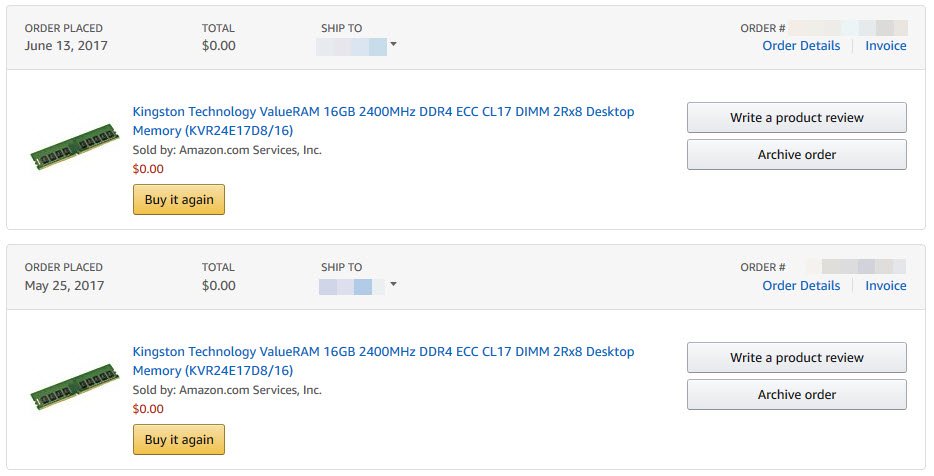
So, over the period of some 6 months, I finally bit the bullet (not to mention the credit card) and purchased an Asrock C236WSI, Intel Xeon E3-1225v6 and 2x Kingston ValueRAM ECC DDR4 2400MHz 16GB UDIMMs… Culminating in final receipt of all the items in July 2017 (I purchased the two sticks of RAM within a day of each other, but Amazon shipped the wrong item for the second stick… twice).

So yes, this post is long overdue… And basically explains the long gap between the last post mid-2017 till now – I have been fighting with this new server hardware and the original draft was first drawn up in September 2017 (refer to date in the URL/permalink).

Continue reading

Ubuntu and UPS…

No, I am not talking about the delivery kind

With an existing PROLiNK 902S 2000VA online UPS providing clean power to my (aging) desktop, I thought it time to finally get a proper UPS for my NAS instead of the old, line-interactive PROLiNK PRO1200SVU that already had to have its dying battery replaced once.

Fortunately, I managed to get a PROLiNK 903S 3000VA unit.

Like the 902S and my desktop, the 903S has its USB cable plugged directly into a/the computer, in the hope of using the provided ViewPower software to monitor the UPS and cleanly and safely shutdown the host should power interruptions occur.

Unfortunately, installation was not at all simple, particularly not since the user manual has no mention of installing the software on Linux (even if the software is “compatible” with Linux, being Java-based).

Googling did not help much, with most/all the returned pages referencing the use of NUTS instead of the intended/provided ViewPower, not to mention needing to “hack” your own “configuration file”, with no guarantee that the runtime calculations are correct.

After much fumbling around, searching and testing, I managed to get it to work…

Continue reading

My Name Is Bond… eno1 and enp3s0 Bond…

With two NICs available on my motherboard (one Intel I217V and one Atheros AR8161B), whereas the product specifications warns that “teaming is not supported”, I am aware that any capable network stack would be able to handle teaming via software (disregarding drivers and assuming certain hardware acceleration features like TCP offloading is disabled).

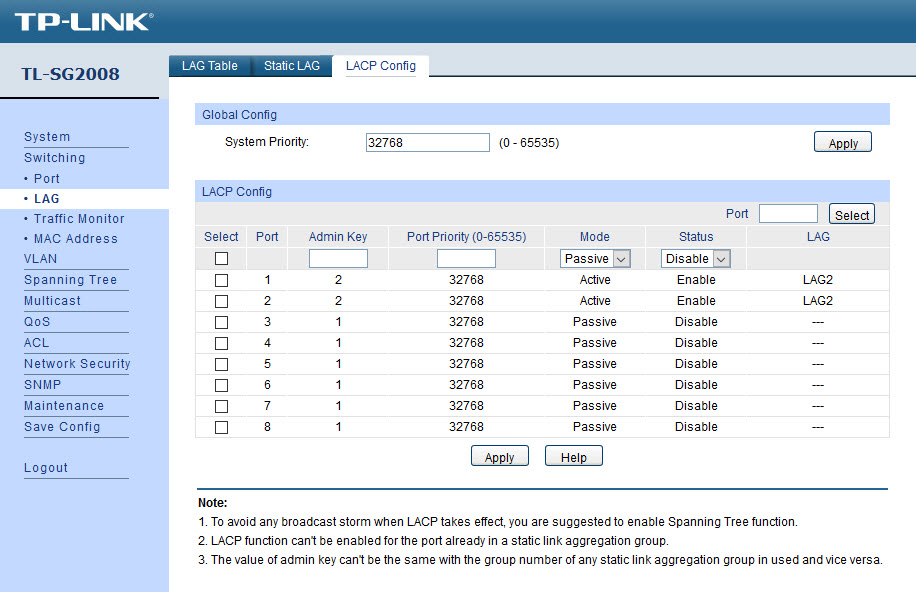
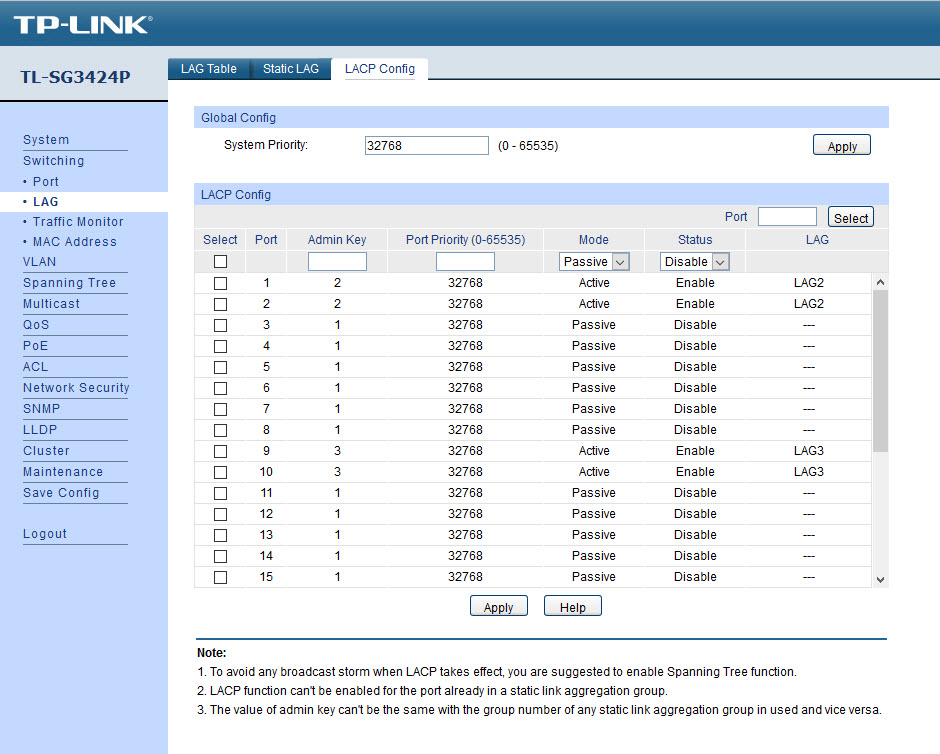
Of course, proper LACP/802.13ad (bonding mode #4) set up requires upstream networking equipment support (i.e. your network switch also requires such support). Fortunately, I happen to have a TP-Link TL-SG3424P managed switch which does support this. Obviously, this is overkill, but I highly recommend the TP-Link TL-SG2008 if 8 ports are sufficient. As I had the chance to run multiple Cat6 cable runs from the closet/store to the various rooms in my apartment when it was renovated, I could, and do, use a SG2008s as a trunk port in my study which is link-aggregated to the SG3424P.

Network Manager

Some instructions on the big, bad Internet mentioned using the Network Manager from the desktop. All that did was to mess up the settings.

Fortunately, I had backups of the /etc/network/interfaces file which I could revert the damage the Network Manager did. So, I finally did the sane thing and just disabled the Network Manager:

If You Want Something Done Right, You Have To Do It Yourself…

So, we come back to the good ol’ shell…

Continue reading