Qotom C3758R Part III…

OPNsense

Given the Linux bridge and QEMU KVM pass-through performance hit, I tried to install OPNsense (based off FreeBSD) and attempted to dual-boot.

Why OPNsense? That was the main reason I originally bought this C3758R unit in the first place – attempting to see if higher performance-to-power efficiency could be achieved with Intel QAT – pfSense’s QAT libraries are only available in their subscription-based pfSense+ product.

In short: a f*cking huge mess…

  • install using custom (not “Auto”) partitioning
  • the installer was UEFI-compatible so managed to find and write its bootloader into the FAT32 EFI partition – since the Ubuntu bootloader mounts the EFI System Partition (aka “ESP”) as /boot/efi, the full path in Ubuntu was /boot/efi/EFI/freebsd/loader.efi
  • but GRUB wasn’t updated, so edit grub:
    • /etc/grub.d/40_custom:
menuentry "OPNsense" {
	insmod ufs2
	insmod zfs
	set root=(hd0,gpt4)
	chainload (hd0,gpt1)/EFI/freebsd/loader.efi
}
      • changing “gptN” to whatever you see as the correct partition when doing an “ls -l” in grub, where the root is the FreeBSD UFS/ZFS partition, and the chainloader is pointing to the ESP
      • removing one of the two insmod lines where not required (i.e. FreeBSD root is UFS or ZFS formatted)
    • run update-grub
  • install the MOK using the UEFI firmware (i.e. the /EFI/freebsd/loader.efi file) – otherwise secure boot would prevent the FreeBSD bootloader from working


That fixed, things went from bad to worse…
Continue reading

The Qotom C3758R Unit Continued…

Just a quick update on networking experiences with this fanless (but hot) unit…


Why Is It Not In Sync? (buy buy buy)…

For some odd reason, throughput on stock Ubuntu 24.04 LTS via a 10GbE SFP+ module was showing asymmetrical speeds on iperf3 – ~10Gbps in, but only ~6Gbps out. Checking the firewall, ensuring jumbo packets (9000 byte MTU), ensuring ufw was disabled, disabling all forms of NIC offloading (although this may actually be inverse to the intended) did not change anything. Furthermore, htop showed one core constantly maxing out when sending (but hovering 60% to 75% on receiving).

Continue reading

10GbE and Jumbo Packets…

For the longest time, I was painfully aware that I was not utilising my 10GbE network switches and NICs to its fullest.

Having to finally sit down, build, test and optimise a software firewall using 10GbE interfaces for some organisation I volunteer at and therefore having to test it in my home lab, I finally was “forced” to sit down and “optimise” my local home lab.

An iperf3 test was not showing good numbers – bouncing around the ~8Gbps mark on a 10Gbps network.

Without fluffing around with kernel and IP stack tweaks, I was aware the easiest way to eke out better performance was to increase the MTU…

Continue reading

Crashing Ubuntu Desktop “System Settings”…

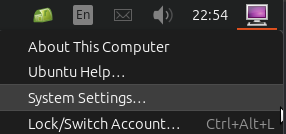
Attempting to get to the “System Settings” “control panel” of Ubuntu desktop on my Server 24.04 LTS installation, I discovered clicking on the “System Settings…” option from the “desktop” bottom (typically top-right corner) did absolutely squat.

After rooting around online, I finally realised that I had been over-zealous in “cleaning out”/uninstalling unneeded apps and libraries – or so I thought was “unneeded”.

Turns out that the audio libraries, even on an “audio-less” server, are still required!

A quick apt reinstall ubuntu-desktop-minimal fixed things right up!

Exporting Clips Off A Dahua NVR Part Trois

New NVR, (Re)new(ed) Problems…

I was trying to find out why I could not see some export controls from the NVR’s web interface, similar to this

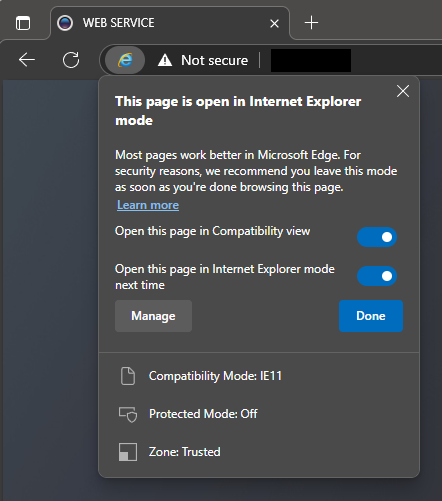
Turns out that, for now, I still need to use “IE Mode” in Microsoft Edge – but as the title posits, it ain’t easy (or at least, it is not just a “button click” away). Microsoft has buried Internet Explorer waaay below 6ft underground…

Microsoft Edge in “Internet Explorer mode”

Just in case that Microsoft link breaks, here is the rundown:

  • in the address bar for Microsoft Edge, type edge://settings/defaultbrowser and then click Enter
  • slide the Allow sites to be reloaded in Internet Explorer toggle to ON
  • restart Microsoft Edge (cue the wind down your window, wind up your window joke from the 90’s)
  • navigate to the website you want to view in Internet Explorer mode
  • click the three dots in the upper right corner of the browser window
  • select Reload in Internet Explorer Mode