pfSense and 2FA…

I wasted quite a bit of time attempting to implement 2FA as part of user authentication on pfSense, firstly finding out that 2FA support was not intrinsic…

Next up, grappling with the FreeRADIUS extension for pfSense 2.7.x and attempting to follow everything from Reddit posts, some time-wasting video posts, to the abbreviated instructions from Google Search and some posts from different Google Search results.

Continue reading

pfSense OpenVPN Server IP Address Changes and DNS Forwarder…

Note to self – if attempting to change the IP address of the OpenVPN server/service, you need to disable the interface then re-enable it, otherwise the DNS Forwarder selection of active interfaces will still take the old IP address (and therefore fail to start).

You will be able to see the pfSense’s debug logs showing a failed attempt to listen on the old IP.

Buffer Bloat…

After then nth time of suffering stuttering during a conference call on my wired connection, I stumbled on to the (common-but-undiagnosed) issue of “buffer bloat” (or “bufferbloat” – whatever spacing floats your boat).

The linked article certainly opened by eyes to the issue via a linked test site, with clear “before” and “after” improvements…

For my own (future) reference in implementing such fixes on pfSense…

Continue reading

pfSense and Empty Packages…

I ran across this issue of having the pfSense’s “Available Packages” under “System” > “Package Manager” show up empty.

I “stupidly” followed the troubleshooting steps, and discovered that everything was back at base release (i.e. version x.y.0), and had to (fortunately, successfully) update both pfSense and packages back to latest.

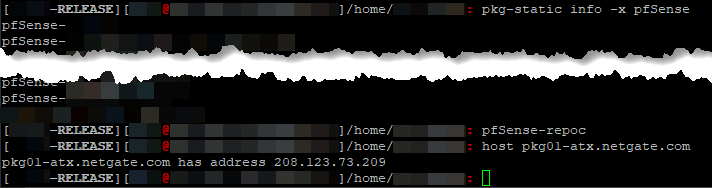
Several different Netgate forums pointed to DNS issues, but I confirmed that I could resolve locally (i.e. my DNS resolver was “listening” correctly on localhost/127.0.0.1 and pkg-static info -x pfSense, pfSense-repoc and host pkg01-atx.netgate.com all worked without issue).

So, it appeared that two fixes were offered:

  1. just hit “Save” on the “System” > “Update” > “Updates Settings” page (without changing anything), or
  2. if you don’t use IPv6, ensure to set your WAN interface “IPv6 Configuration Type” to “DHCP6” instead of “None” (under “Interfaces” > “WAN”)

I tried #2 and have pulled the repository but reverted the change (I hate setting something I know I’m not going to use), so will update later on if the issue reoccurs and I can test #1.

Upgrading to pfSense 2.7.0…

Tried upgrading to 2.7.0, and as per usual, (mini) disasters ensued…

Here are some tips I need to remind myself:

  • install the sudo package (since the default admin account is disabled) – you should be able to sudo tcsh after logging in using SSH2
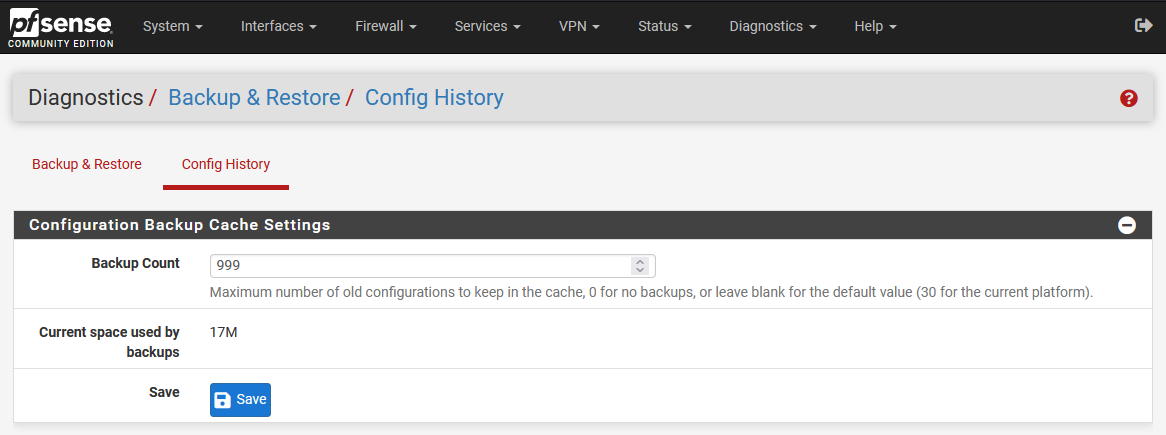
  • ensure your configuration backup is current (and try changing the number of auto-backup-on-change to some high number, found under Diagnostics > Backup and Restore > Config History)
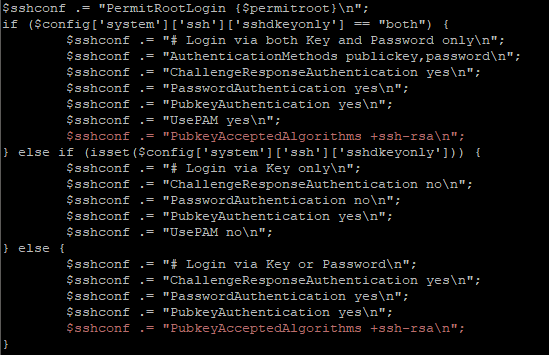
  • if using “old” RSA keys for SSH2 authentication, ensure to add the following to /etc/sshd:
  • try forcing a higher resolution text mode (unfortunately, that didn’t work for me):
    • /boot/loader.conf.local:

      kern.vty=sc
      

    • /boot/device.hints:

      hint.sc.0.flags="0x180"
      hint.sc.0.vesa_mode="279"

Clamping Down HARD on DHCPd MACs…

There is an eight year old issue (at the point of writing this) with pfSense DHCPd that somehow did not restrict DHCPd IP “handouts” despite the chosen setting to “Deny unknown clients”… Which, after some digging, turns out more to be of a misunderstanding than what the “common people” would think.

Despite the “Deny unknown clients” setting, certain clients requesting an IP from a pool/interface that does not explicitly list its MAC address will still get an IP address. It turns out that said client is considered “known” if the MAC is listed anywhere else (i.e. in some other MAC address list)…

Anyway, I got fed up with this seemingly insecure behaviour and managed to hack a fix… some 8+ months ago… Just that I never got around to posting the details for people willing to hack their own pfSense fix (unlike my other SSHd configuration fix which was documented in full)…

Well, to cut the long story short, the pull request (merged with another upstream fix) has now been accepted and merged (actual changes)… You will see this fix some-time-soon-now in some upcoming pfSense release… Enjoy!

2021/02/28 Update: A year later and only now is the DHCPd fixes released with a new stable release (2.5.0), instead of the expected 2.4.x! Well, it’s “finally out there”…

2021/06/01 Update: As of time of writing, it appears that 2.5.0 and 2.5.1 are, unfortunately, bugged and I do not recommend upgrading to 2.5.0/2.5.1…

2021/07/07 Update: pfSense 2.5.2 is now released… YMMV…
Securing pfSense SSH2…

So, as exposing the HTTPS administration page of pfSense to the big, bad, Internet is a big “no no”, the only proper way should be to set up SSH2 and allow port forwarding.

Now, there are already articles out there telling you that using username+passwords to secure SSH2 is not the way to go… Using certificates is. However, I wanted more… I wanted both… Why is it that pfSense will only allow one or the other when sshd already allows enforcement of both?

So, once again, rolling up my sleeves, I dived into the murky waters of the pfSense shell…

Continue reading

Software Firewall…

The Problem

I have been using an Asus RT-AC68U, followed by an RT-AC87U, running Merlin’s firmware with customised firewall scripts for the longest time. However, both units had a persistent issue with some (not all) sites being inaccessible, total resets and re-configuration from scratch regardless.

Having confirmed it was an issue with the router(s) and not the firmware nor firewall rules nor server-side blocks, and not being able to find a solution, I decided to just utilise a software firewall. One that I knew well and trusted was/is pfSense.

The Other Problem

At the very same time, I finally discovered that the boot failures of my server was actually due to the PSU (read other Amazon reviews citing similar fan-spin-up-then-dies failures). Having not had time to look at the frequently (and randomly rebooting server), I finally purchased whatever SFX module that was in stock at the local “IT complex” – another Silverstone SST-SX600-G unit… Crossing my fingers that the PSU was the culprit…

2018/06/04 Update: Nope, false hope again… Server is still rebooting rather “randomly” despite using a brand new Corsair SF600

Continue reading