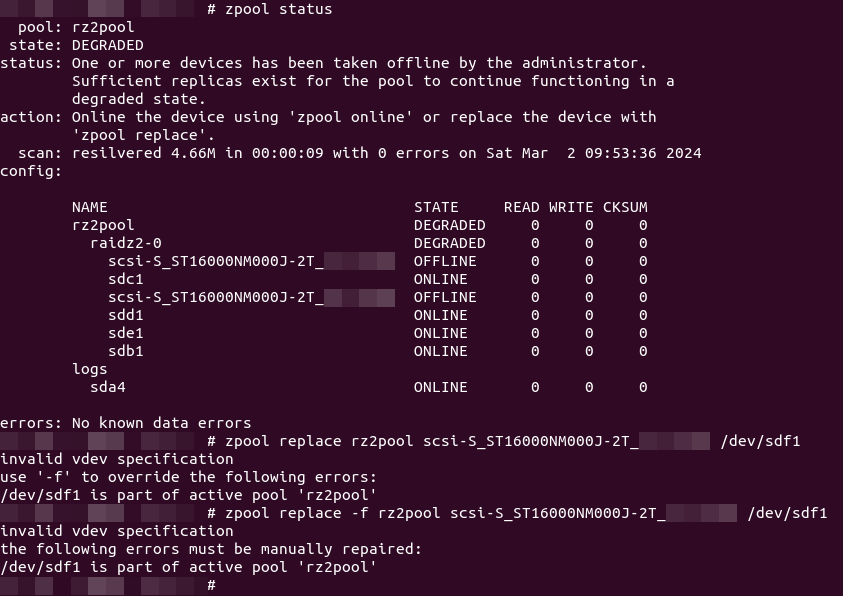
So, with the latest replacement of disks in my RAIDZ2, I used zpool replace <pool> <old ID> /dev/sdx. Previously, while replacing with like-sized drives, it was not an issue (unless your replacement drives had “less space”).
But using the new 16TBs, I realised that ZFS decided to create one single honking 16TB partition (and a “partition #9” 8MB “buffer”), instead of matching the required 6TB and leaving empty space for future use, even when the pool had “autoexpand=off“.
So I should have replaced using a manually created partition instead of assigning the whole disk…
Sigh… Let’s see what we can do…
The simplest “hack”/”quick fix” I could think of was:
- force the device offline
zpool offline <pool> /dev/sdx
- forcibly shrink the partition, assuming:
- you know both the starting sector (typically 2048) and ending sectors of the other “correctly sized”, existing RAIDZ2 partitions
- use
parted /dev/sdx unit s printto get the start and ending sectors of another working drive
- use
- run
partedto shrink the first (and only) partition – note the trailing “s“ that tellspartedthe number is the ending sector instead of treating it as some other unit like MiB or GiB):parted resize /dev/sdx 1 <ending sector>s
- you know both the starting sector (typically 2048) and ending sectors of the other “correctly sized”, existing RAIDZ2 partitions
- force the whole drive into a degraded state by changing the drive and partition unique GUID:
- run
gdisk - select/enter
/dev/sdx - key in “
x” to enter the “extra functionality (experts only)” menu - key in “
f” to randomise both the disk and partition unique GUID - key in “
w” to quit
- run
- (optionally) reboot (
shutdown -R now) to ensure the system picks up the new information, or at least force a refresh (udevadm trigger) - bring the device back online
zpool online <pool> /dev/sdxzpool statusshould now show/dev/sdxas “DEGRADED”
2024/03/21 Update:
I got a few more new 16TBs; being the wiser, I needed to first create the same-sized partitions before specifying the replacement as the specific partition (instead of disk); so, instead of the above steps (which are unnecessary):
- create the partition (assuming brand new, empty drive):
parted mkpart <name> 2048s <ending sector>s– note the trailing “s“ that tellspartedthe number is the ending sector instead of treating it as some other unit like MiB or GiB), where:
nameis the name of the partition (I simply use the theID_SERIALfromudevadm info --query=property /dev/sdx|grep "ID_SERIAL=")- ending sectors is the ending sector of the other partition(s) you are attempting to match the size for (use
parted /dev/sdx unit s printto get the start and ending sectors of another working drive)
- replace the device with the partition
zpool replace <pool> <current ID shown> /dev/sdxn
- and resilvering should ensue (I don’t think there’s a way to avoid this, unless we have some
zdbwizardry followed by azpool scrub) - if you get the “
/dev/sdxn is part of active pool '<pool>'” error, you will have to clear the ZFS label info but resilvering will (still) be required
zpool labelclear -f /dev/sdxnzpool replace <pool> <current ID shown> /dev/sdxn- resilvering should start